
Активный

- Тема Автор
- #1
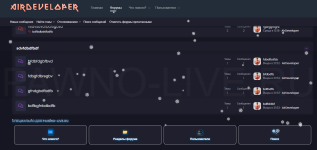
Приступим
Внешний вид - Виджеты - Добавить виджет - HTML
Ключ виджета - widget_macros
Заголовок - На свое усмотрение
Позиции для отображения - Список форумов: ниже списка узлов позиция - 1
В шаблон прописываем этот код:
HTML:
<span style="color:009bf5; text-shadow: 1px 1px 6px #009bf5;font-weight: bold; background-image: url('https://i.imgur.com/2kgeoud.gif');background-repeat:repeat">СПЕЦИАЛЬНО ДЛЯ PAWNO-LIVE.RU</i><span/>
<div class="custom-quick-nav">
    <a href="{{ link('whats-new') }}" class="nav-card">
        <div class="nav-icon">🆕</div>
        <span>Что нового?</span>
    </a>
    <a href="{{ link('forums') }}" class="nav-card">
        <div class="nav-icon">📁</div>
        <span>Разделы форума</span>
    </a>
    <a href="{{ link('members') }}" class="nav-card">
        <div class="nav-icon">👥</div>
        <span>Пользователи</span>
    </a>
    <a href="{{ link('search') }}" class="nav-card">
        <div class="nav-icon">🔍</div>
        <span>Поиск</span>
    </a>
</div>
Ставим галочку на расширенный режим
Далее переходим в Шаблоны Extra Less и прописываем этот код:
CSS:
.custom-quick-nav {
    display: grid;
    grid-template-columns: repeat(auto-fit, minmax(80px, 1fr));
    gap: 10px;
    padding: 10px;

    .nav-card {
        display: flex;
        flex-direction: column;
        align-items: center;
        justify-content: center;
        padding: 15px 5px;
        background: #1f1f2e;
        border-radius: 12px;
        text-decoration: none;
        color: white;
        font-weight: 600;
        font-size: 0.9em;
        text-align: center;
        border: 1px solid #eee;
        transition: all 0.3s ease;
        box-shadow: 0 2px 4px rgba(0,0,0,0.05);

        &:hover {
            transform: translateY(-2px);
            box-shadow: 0 5px 10px rgba(0,0,0,0.1);
            color: #000;
            border-color: #007bff;
        }
        .nav-icon {
            font-size: 1.8em;
            margin-bottom: 8px;
        }
    }
}